AI for MSME India: use cases that pay back
AI for MSME India pays back on Tally and WhatsApp desk jobs. Sensors and forecasts wait until the data exists. What to run first, and what not to buy.
A dealer PO on WhatsApp should become one Tally sales order. Here is the draft a person approves, and the lines the system must not guess.

Nimish Gahlot
Founder, Empulse Labs
· Updated · 14 min read
Published
Updated · 14 min read
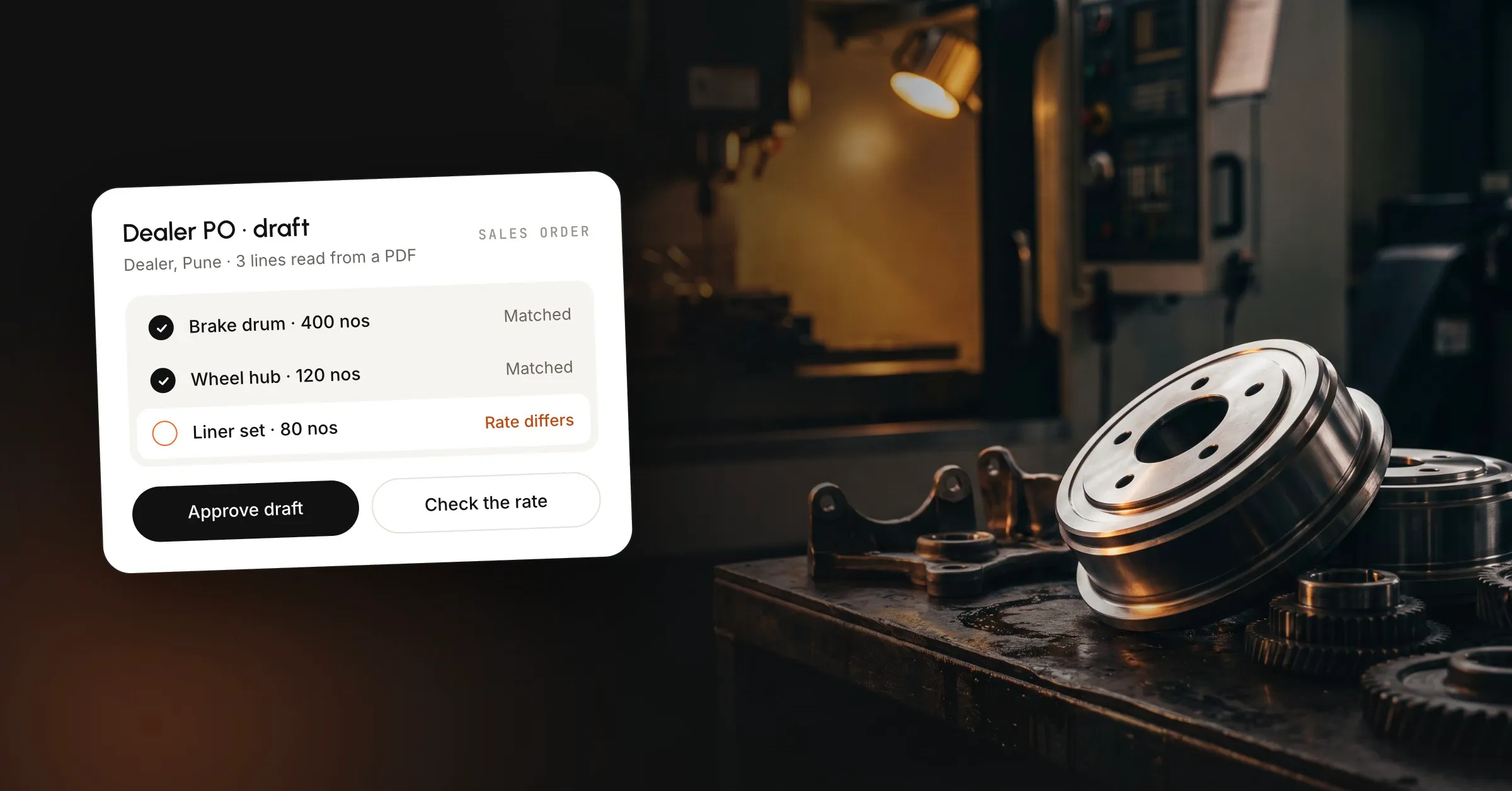
Purchase order to sales order automation takes the purchase order a dealer sends and turns it into a draft sales order in the books you already keep. In an Indian MSME factory that order usually arrives as a WhatsApp photo, a PDF or an Excel sheet, and someone types it into Tally, Busy or ERPNext. Then someone else types it again, because the first pass mixed up a similar item code or carried last month’s rate. A person still checks the item and the rate, and the lines that already match do not need to be typed a second time. The draft matches those lines, and nothing posts until a named person approves it.
Purchase order to sales order automation reads an incoming customer purchase order and prepares the sales order on your side. The dealer already wrote what they want to buy, and your order desk is about to write what you have agreed to supply. The software reads the order and matches it, and a person still decides whether to accept the order.
You raise this sales order from the purchase order the dealer sent you. Procurement tools that approve your own indents are a different desk, and the search results mix the two. A photo of last month’s sheet with two quantities changed is a sales order problem.
The order can arrive as an email PDF, an Excel file, a scan, a portal upload, or a message on your WhatsApp Business number. A few large OEMs send EDI, which is already structured, and everyone else sends a document. The WhatsApp Business Platform is how that business number sends and receives messages, and the dealer does not get a new portal.
What has to change between the two documents:
A line that cannot be translated that way waits. Guessing a nearby item code is how a brake liner ships as a brake drum.
The same PO shows up three times: sales saves the WhatsApp photo, stores forwards the email PDF, and the dealer calls to ask if you got it. None of those copies is the sales order, so someone still keys the lines.
Production hears about the order after that keying. Until a row exists, the job is not on the Excel board, even though the dealer already thinks it is booked.
Then a second person checks item, quantity and rate, because the first pass drops a quantity, swaps two similar codes, or lets Tally’s last rate stand when this month’s PO moved the price. Lines with none of those problems stay on the draft and do not get typed again.
On a typical Monday the photo is keyed, the checker sends a rate back, and the supervisor hears about the lot when the day is already planned. That sequence is a pattern on the desk, and nobody has timed it as a study of one plant.
We see this where dealers reorder the same parts: auto components, packaging, plastics, standard engineering SKUs. The party and the item code are already in the master, so the new fact is what changed on this order. A job shop that redraws the routing for every drawing is a different problem, and this workflow is the wrong first build for them.
The purchase order is the buyer’s request. The sales order is your commitment to supply, at a quantity, a rate and a due date, under a number you can track. Tally Help describes the sales order as the document you issue once you have the customer’s purchase order, so delivery and the sales invoice can point back at it.
| Document | Who writes it | What it does |
|---|---|---|
| Purchase order | The dealer | Asks you to supply these lines |
| Sales order | Your team, after a yes | Books the order in your books |
| Tax invoice | Accounts, after supply | Asks for payment, and may need an IRN |
One purchase order can become one sales order with many lines. A revision stays on the first booking until someone says that booking is dead. A partial dispatch leaves the original order open for the balance.
A sales order books the supply. A sales invoice asks for the money and, when the rules apply, is the document you report for GST. In TallyPrime you can raise a delivery note against the sales order and then the invoice, or invoice against the order directly. Tally’s sales process is explicit that you do not have to use every step, and you do not have to use them in one fixed order.
In ERPNext the chain runs quotation, sales order, delivery note, sales invoice, payment. The sales order holds the customer, items, rates and the customer’s purchase order number before anything is dispatched. Saving it does not recognise revenue or file a tax invoice, so you stop at a draft.
Matched lines are proposed on the draft, and lines that need a decision are labelled.
Keep the original next to the draft. The approver should see the photo or the sheet, not only the parsed lines. If the same purchase-order number is already open for that party, stop and show the existing order. The second file is a duplicate until a person calls it a revision.
Match the sender to the party master before any line is trusted. If the name is new, the GSTIN is new, or two ledgers could both be this dealer, show both and leave the party unselected.
Then match each line to the item master.
If the code is unsure, that line stops and does not create a stock item. Alt+C in Tally will make a master mid-voucher, which is fine for an accountant who means it and a bad default for a machine.
The rate comes from the last accepted price for that party and item, or from a rate card someone will stand behind. The rate printed on the PO is evidence, and when the two differ the line is flagged. Tally will also fill a rate from an earlier sale, so the draft has to show the difference instead of saving it.
GST is its own line, taken from the item master. A PO that prints a tax-inclusive price has to be split back out, or the line waits. HSN stays the one on the stock item. Terms (credit days, freight, the usual discount) come from the last accepted order for that party, and the draft shows those terms as they stood on that order.
A delivery date printed on the PO is the dealer’s request, and the Due on field in a Tally sales order can hold it. A date your planner has not agreed to stays blank until a person sets it.
The output is a draft sales order: party, order number, lines, quantities, rates, GST, the customer’s purchase-order number, and a note on every line that was not clean. In Tally a saved sales order is a live document that delivery and invoicing can close against, so that save waits until after the approval. In ERPNext, submitting the sales order confirms the commitment, so leave it unsubmitted until the same approval.
Nothing in this step reschedules the floor, explodes a multi-level bill of materials, or chooses a work center. Those jobs belong to a planning system, and this step makes the booking visible.
The named person approves the draft or sends it back with a change.
The person is whoever you name, usually sales, the estimator, or the owner. They should see the original document, the master row used for each line, and only the exceptions in detail. Three quiet lines and one flagged line is a normal PO.
Credit is a separate stop. If outstanding for that party is already past the limit you set, the draft does not confirm, and sales can see the balance before they say yes. We leave credit control with your team. A statement to an overdue dealer is a later workflow, and so is a collection message.
Outside a rate tolerance or value cap you set, the approver has to judge the margin, and those rules stay with your people. The log shows who approved, when, and what they saw. You can pause the whole workflow.
Some large ERPs write a high-confidence order straight in. Oracle’s order-management agent can create sales orders from a mailbox with no one in the loop, and Oracle’s converter note still says to review holds before the order moves on. That design does not fit a company whose Tally voucher is the books, so the approval stays in front of the save.
This is a sample, using the quantities from the example on our manufacturing page, plus two rule rows that page states in words. It names no customer and it is not a measured result.
| What arrived | What the draft did | What a person sees |
|---|---|---|
| Brake drum, 400 nos | Party and item matched | Rate differs from last order |
| Wheel hub, 120 nos | Matched to the item master | Nothing to fix |
| Liner set, 80 nos | Matched to the item master | Nothing to fix |
| Stud kit, 400 nos | Item matched | Rate needs a person |
| One line, no quantity | Held | Missing quantity |
| Same PO number again | Held as a duplicate | Copy, revision, or new lot |
The brake-drum rate is the line worth a person’s time. The wheel hub and the liner set are already matched, so they do not need to be typed again, and the missing quantity stays blank. Send the draft back, fix the one cell, or approve it at the rate you actually want. The buyer does not see a price until that happens.
Job status, if you answer it at all, comes from the job record you already keep: running, waiting on material, or ready to dispatch. The bot does not invent a dispatch date.
These are the lines we refuse to correct automatically. Each one shows up on an ordinary dealer purchase order.
OCR that only returns text does not handle this list. Text without your item master is a sheet someone still has to code, by matching each line and stopping when the match fails.
Tally, Busy or ERPNext stays the system of record. We read parties, items and outstanding, and we park drafts. Your accountant still closes the books the same way.
As of the Tally Help page updated 27 April 2026, you record a sales order from Alt+G (Go To), Create Voucher, F10 (Other Vouchers), then Sales Order. If the voucher type is inactive, Tally asks you to activate it. You enter the party, the order number, the sales ledger, and for each stock item the due date, quantity and rate. The rate fills from an earlier sale if there was one. Ctrl+A saves.
That save is what delivery notes and sales invoices close against. Sales Order Outstandings shows what is still open, by stock item, by ledger, or as all orders, including quantity still to deliver. You can pre-close an order you will not finish. A draft that never becomes this voucher never appears on that report.
The walkthrough below is that manual path, filmed in 2021. Use the Help page for current keystrokes.
TallyPrime can also send a saved invoice or report to a party’s WhatsApp number, once a registered business number is connected. That Help page covers outbound sharing of documents already in Tally, and it does not read a dealer photo or turn one into a sales order.
Put the dealer’s PO number on the sales order, not only in a narration. ERPNext has a field for it. In Tally it can sit on the voucher, or on each line if you turn that on in F12. Their accounts will hold your invoice if the reference is missing. The draft copies it from the document and refuses a second open order with the same number for the same party.
As of October 2026, GSTN’s e-invoicing page describes e-invoicing as reporting specified GST documents to an Invoice Registration Portal and receiving an invoice reference number. It does not mean a government portal creates your invoice. You keep preparing the invoice in your own billing system. The documents GSTN names there are GST invoices, credit notes and debit notes for B2B supplies and exports. A sales order is not on that list.
The GSTN e-invoice leaflet says that from 1 August 2023 the notified aggregate turnover is ₹5 crore, for a PAN that crossed it in any preceding year from 2017-18, with exemptions in the notifications. Confirm that figure against the latest notification before you rely on it. The IRN is generated when the tax invoice is reported, from the billing you already run. Automating the sales order does not file the e-invoice or the e-way bill.
Start here when prices are repeatable and the masters exist: the same dealers, the same SKUs, a rate you can point at. The checker gets a draft they can finish, on your number and your books, live in 3 to 6 weeks. If it does not work in 45 days, the setup fee comes back.
Start with an RFQ draft instead when the enquiry is still a price, and a rate card or a last accepted price exists that the estimator will sign. Skip this workflow when every job is a new routing from a drawing, or when the real ask is a finite schedule, a multi-level bill of materials, or a new ERP. Vendor follow-up, inspection notes and dispatch messages come after the booking is a voucher someone approved.
If you are deciding whether Tally can carry the rest of the factory, read Tally Prime for a manufacturing company. For where purchase-order entry sits among the other AI work worth paying for, see AI for MSMEs in India.
If dealer purchase orders are still keyed by hand, that desk is the one to look at first. We build the system for sales and operations on the tools you already run, and your team owns it. The same order-entry shape shows up on a wholesale trading desk. For a factory, the booking, the approval and what we will not automate are on the manufacturing page. The wider set of systems is under services.
Reading the words is the easy half, and we will not quote an accuracy percentage we have not measured on your orders. The failure that matters is a near miss, two stock items whose names are close, or a quantity the photo does not show. Those lines wait. A wrong item code posted into Tally is worse than a draft that stops and shows both masters.
No. A photo of a handwritten indent, a PDF, an Excel sheet with two cells changed, and a chat line such as "same as last time, 400 drums" can all feed the same draft. The dealer keeps the habit they already have. The match is against your party master and item master, so the format is not the control. An unreadable line is.
Not in the build we ship. A matched line is a proposal. Some large cloud ERPs will create the sales order from an email with nobody in the loop. On a factory desk we park the draft and wait for a named yes, including on the quiet lines. You can pause the whole workflow. The log shows who approved, when, and what they saw.
The first workflow is one desk, dealer purchase orders into a draft sales order, on the WhatsApp Business number and the books you already run. That goes live in 3 to 6 weeks. Vendor follow-up, inspection notes and dispatch messages wait until that desk is trusted. If it does not work in 45 days, the setup fee comes back.
Their code is a label, not your stock item. The draft looks for a mapping you already trust, from earlier orders of that party or from a list you maintain. If two of your items could fit, or none can, the line stops and shows the dealer's wording beside the candidates. It does not create a new stock item because the code was unfamiliar.
Hold the second copy. Dealers send the photo, then the PDF, then a call to ask if you got it. The draft should surface an open order for that party and that purchase-order number and wait. Posting both creates two jobs for one booking. A person decides whether the second message is a copy, a revision, or a new lot.
AI for MSME India pays back on Tally and WhatsApp desk jobs. Sensors and forecasts wait until the data exists. What to run first, and what not to buy.
Tally Prime posts the batch, the bill of materials and the job-work challan. A schedule is a different system. The clicks, and where to stop.
The columns a rental desk needs for bookings, availability, deposits and GST invoices, and where that sheet still double-books a unit.
Book a 30-minute call. We'll map the workflow costing you the most hours and tell you honestly whether AI can fix it.
Book a 30-min call